What NgRx Actually Is, and the Change Detection Problem It Quietly Solves
What NgRx Actually Is, and the Change Detection Problem It Quietly Solves
"Just use NgRx" is advice every Angular dev has heard at some point. The problem is that without understanding why, it just becomes another library to memorize. Before getting into NgRx itself, it's worth understanding a more basic problem it happens to solve along the way: how Angular decides when to redraw the screen.
One thing before we start: none of this needs Signals. The NgRx I'm describing here is built on top of RxJS and has been around since long before Signals showed up in Angular. I use it right now on a system at work that can't move to a newer Angular version yet, no Signals available there, and the organization and performance payoff I'm about to walk through holds up exactly the same.
The problem before NgRx: how Angular decides what to redraw
By default, Angular uses a library called Zone.js to know when "something
might have changed." Zone.js patches nearly every async browser API
(setTimeout, clicks, fetch, Promises), and every time one of those
fires, it tells Angular: "something happened, better go check."
Angular then walks the entire component tree, top to bottom, checking whether anything changed. That's the default change detection strategy, and it works fine on a small screen. On a large application with hundreds of components, clicking some unrelated button makes Angular re-check components that have nothing to do with that click. Expensive, and unnecessary most of the time.

That cost is exactly why the OnPush strategy exists: you opt a component
out of that automatic cycle. With OnPush, Angular only re-checks that
component when:
- an
@Inputchanges by reference, - an event (click, keystroke) originates from inside it,
- an
asyncpipe emits a new value, - someone calls
markForCheck()manually.
The detail that catches most people off guard is the word "reference." If
you have an array in state and just call push() on it, the array is
still the same object in memory, so Angular looks, sees the same reference
as before, and concludes nothing changed, even though it did. With
OnPush, mutating state directly simply doesn't work. You always have to
create a new object to represent the new state.
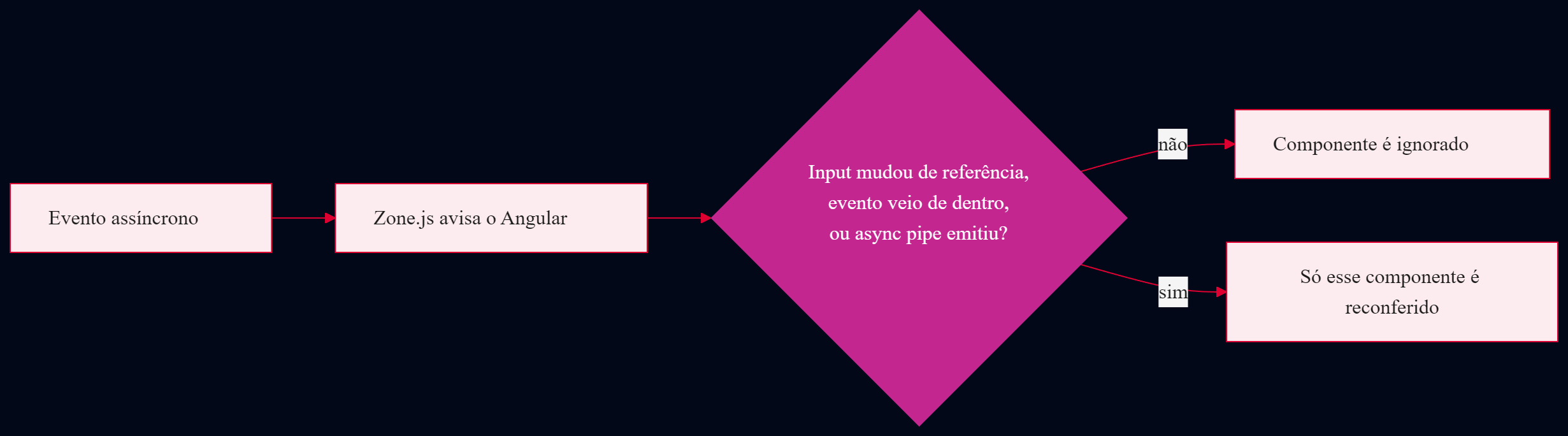
In other words: OnPush is a lot cheaper, but it demands discipline,
never mutate state, always create a new one. That's exactly the discipline
NgRx enforces by default, which means before it's about "organization,"
it's already aligned with what Angular needs to perform well.
What NgRx actually is
NgRx is a state management library for Angular, inspired by Redux (which
came out of the React world) and built on top of RxJS. The core idea is
simple: state that several screens or components need to share lives in
one place, called the Store, and the only way to change that state is
by dispatching an Action, which gets processed by a pure function
called a Reducer. The reducer never mutates the old state, it always
returns a new object. That's the exact same behavior OnPush was asking
for a minute ago, just now guaranteed by the architecture itself instead
of by whoever happens to be writing the code that day.
How far back this goes
NgRx has been around since the early days of modern Angular, and every major version of it tracks the matching major version of Angular: NgRx 18 runs on Angular 18, NgRx 20 on Angular 20, and so on.
There's also a more recent option, @ngrx/signals: a separate package for
building the Store using signalStore() instead of the classic
Action/Reducer/Effect trio. It landed in developer preview in NgRx v17 and
went stable in v18. The pillars coming up next are the classic foundation
(the one I use on the system at work, and the one @ngrx/signals
reorganizes under the hood), there's a section further down showing what
the same example looks like in that newer flavor, for anyone already on a
project that uses Signals.
The pillars of NgRx
To keep this from staying purely theoretical, picture a simple shopping cart: add a product, remove a product, apply a discount coupon. That's the same example used in formigadev-ngrx-example, the repo the DevTools screenshots further down come from (its code is in Portuguese, since that's how I built it, but the shape maps 1:1 to what's below). State shape:
export interface Product {
  id: string;
  name: string;
  price: number;
}

export interface CartItem extends Product {
  quantity: number;
}

export interface CartState {
  items: CartItem[];
  discountPercent: number;
}

export const initialState: CartState = { items: [], discountPercent: 0 };Store: where the state lives. Think of it as that screen's "database" for as long as it's open.
Actions: named events, sometimes carrying a bit of data. The only thing allowed to say "I want to change something."
export const itemAdded = createAction( '[Products] Item Added', props<{ product: Product }>(), );Reducers: a pure function that takes the current state and an action, and returns a new state. "Pure" here means: same input, same output, every time, with no side effects outside itself.
export const cartReducer = createReducer( initialState, on(itemAdded, (state, { product }) => ({ ...state, items: [...state.items, { ...product, quantity: 1 }], })), );Selectors: a function that reads one specific slice of state. Comes with memoization built in, so if nothing it depends on changed, it doesn't recompute, it just returns the previous value.
export const selectSubtotal = createSelector( selectItems, (items) => items.reduce((total, item) => total + item.price * item.quantity, 0), );Effects: where side effects live, like calling an API. An effect listens for an action, does the async work, and at the end dispatches another action with the result. It never touches state directly, it only dispatches the next action, the reducer is still the only thing that changes state.
@Injectable()
export class CartEffects {
  applyCoupon$ = createEffect(() =>
    this.actions$.pipe(
      ofType(couponRequested),
      switchMap(({ code }) =>
        this.couponService.validate(code).pipe(
          map((percent) => couponApplied({ code, percent })),
          catchError((error: Error) => of(couponFailed({ message: error.message }))),
        ),
      ),
    ),
  );

  constructor(
    private readonly actions$: Actions,
    private readonly couponService: CouponService,
  ) {}
}
Put the pillars together, and the full path of a state change is always the same one-way street:

On the component side, that entire flow collapses into two lines: one to dispatch the action, one to read the selector, no Signal needed for any of it:
@Component({
  changeDetection: ChangeDetectionStrategy.OnPush,
  template: `<li *ngFor="let item of items$ | async">{{ item.name }}</li>`,
})
export class CartComponent {
  private readonly store = inject(Store);

  protected readonly items$ = this.store.select(selectItems);

  add(product: Product) {
    this.store.dispatch(itemAdded({ product }));
  }
}
items$ is a plain Observable, no Signal involved. The async pipe in
the template subscribes to it and calls markForCheck() on its own with
every new value, the third OnPush trigger from the list at the start of
this post. That's how an app on Angular 15, with no Signals available at
all, still gets fine-grained control over when each component re-renders.
No component ever changes state directly. Everything goes through the same queue, which makes it a lot easier to trace "what changed and why" when something breaks, and that's exactly where the next part comes in.
The cart above is the lean version, just enough to walk through the
pillars. The full version (with Angular Material, the coupon's
loading/error states, and a reducer test) lives in
formigadev-ngrx-example,
its carrinho.actions.ts, carrinho.reducer.ts, and carrinho.effects.ts
are pretty much the same snippets shown above, just named in Portuguese.
That's also where the DevTools screenshots below come from.
The modern version: the same pillars with @ngrx/signals
If you're already on a project that uses Signals, @ngrx/signals builds
the same idea a different way: instead of separate action, reducer, and
selector files, everything lives inside one signalStore(). The same
cart, in this version:
export const CartStore = signalStore(
  { providedIn: 'root' },
  withState<CartState>({ items: [], discountPercent: 0 }),
  withComputed(({ items }) => ({
    subtotal: computed(() => items().reduce((total, item) => total + item.price * item.quantity, 0)),
  })),
  withMethods((store) => ({
    add(product: Product) {
      patchState(store, (state) => ({
        items: [...state.items, { ...product, quantity: 1 }],
      }));
    },
  })),
);@Component({ changeDetection: ChangeDetectionStrategy.OnPush /* ... */ })
export class CartComponent {
private readonly cartStore = inject(CartStore);
protected readonly subtotal = this.cartStore.subtotal;
add(product: Product) {
this.cartStore.add(product);
}
}withState is the Reducer and the Store rolled into one. withComputed
is the Selector, memoized automatically just like Angular's own
computed(). withMethods is where Action and Reducer blend together:
patchState still creates a new object under the hood, the exact same
immutability discipline OnPush asked for at the start of this post, you
just don't write it by hand.
There's also a middle ground, without rewriting everything into a
signalStore: keep the classic Store, Reducer, and Effect as they are
(what the previous section showed) and just swap the component's
select() + async pipe for selectSignal(), available on the regular
Store since v17. It moves the read side to a Signal without touching
anything else.
The reasoning doesn't change, only where each piece lives changes. Effects
have an equivalent too (rxMethod), but the core idea already comes
through with just state and reads. If the project is new and already uses
Signals everywhere, this version tends to mean fewer files for simple
state. On a bigger project, with several teams touching the same state,
the explicit separation of Action/Reducer/Effect still earns its keep: it
forces a name onto every possible change, which is exactly what makes the
DevTools history in the next section easy to read.
NgRx DevTools: watching state happen
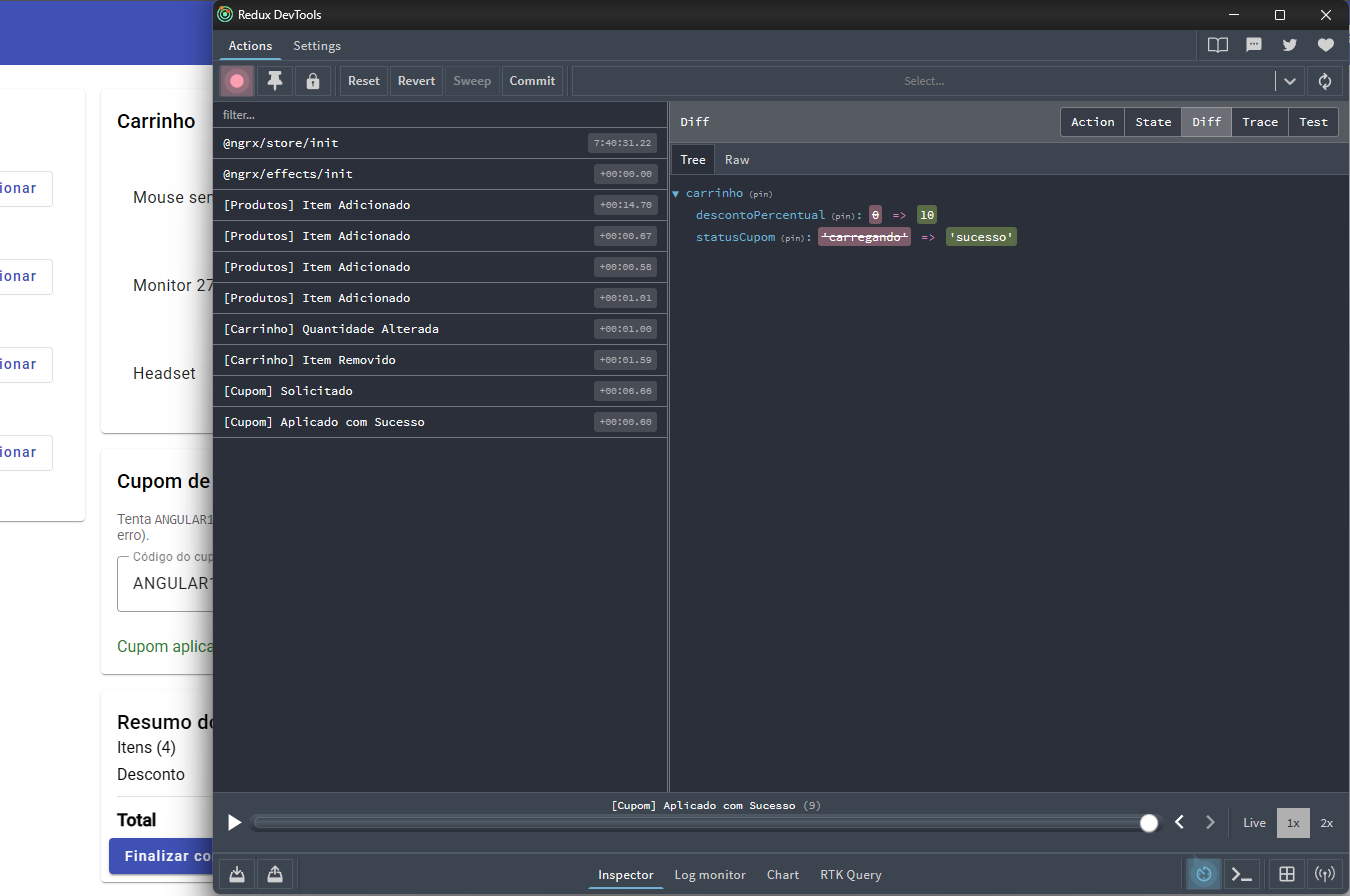
Since every state change goes through a named action, those actions can be
logged on a timeline and the state inspected at any point along it. That's
what the @ngrx/store-devtools package does, wired into the Redux
DevTools browser extension.
In practice, it shows three things:
- Action log: every dispatched action, in order, with a timestamp.
- State inspection: the full state (or the diff) at any point on that timeline.
- Time travel: jump backward and forward between actions, reproducing the exact application state at that moment, with no need to manually rebuild the scenario.
Running formigadev-ngrx-example with the Redux tab of DevTools open, the action log shows every click turning into an action, in order:
And clicking on any one of those actions, the full application state at that exact point on the timeline:
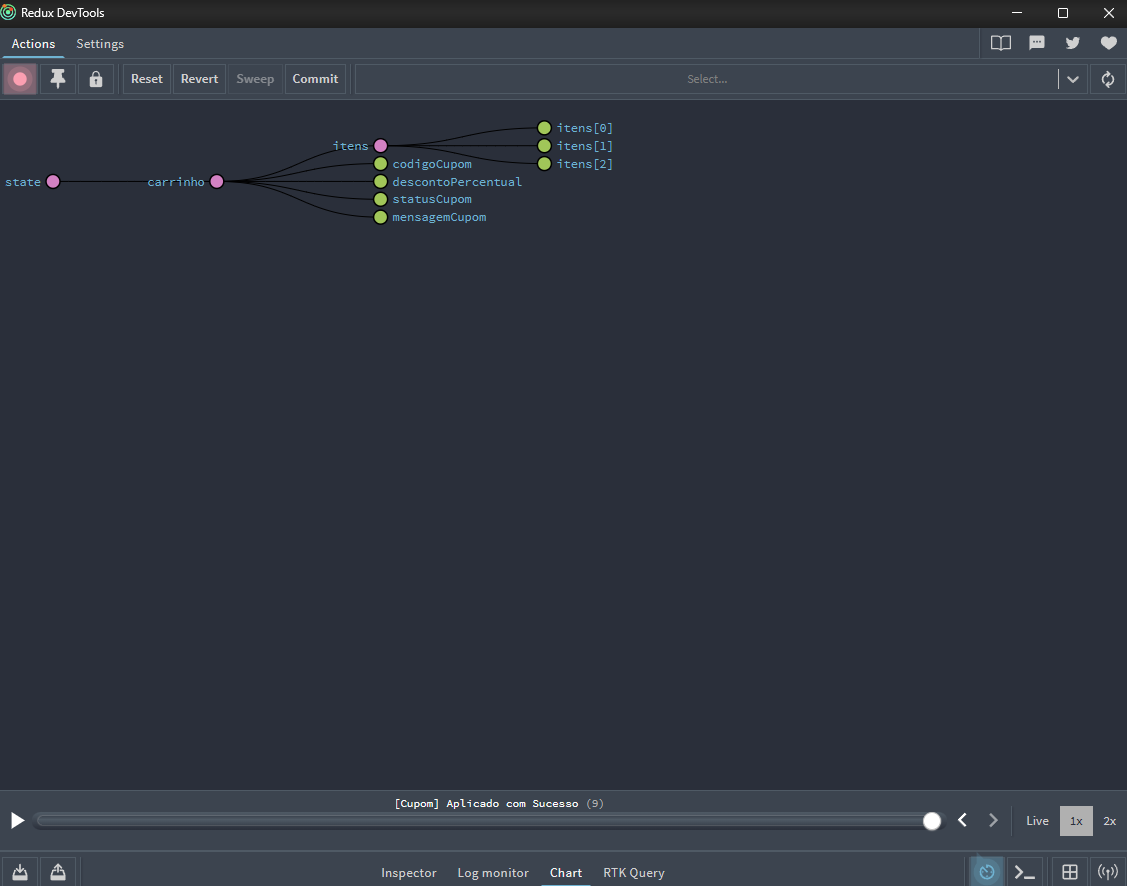
That changes how you debug. Instead of trying to reproduce a bug from scratch by guessing at steps, you can ask for the action log (or reproduce it locally) and just walk the timeline until you land on the exact point where state went wrong.
Wrapping up
NgRx usually gets sold as "organization": one place to keep state, one way
to change it. That's true, but it's only half the story. The other half is
that the exact same discipline (never mutate, always a new object) is the
exact requirement OnPush needs to stop depending on Zone.js sweeping the
entire tree on every event. Organization and performance, in this case,
turn out to be the same habit seen from two different angles.