How this blog is built: Analog.js, real SEO, and what Lighthouse actually found
How this blog is built
The first post already explained why this site exists. This one is about what's actually inside it: what Analog.js is, why each piece of the stack is here, how a post goes from a Markdown file to a live page, and what changed once I stopped assuming the site was fast and accessible and actually measured it.
What Analog.js is
If you haven't run into it: Analog.js is a meta-framework for Angular. "Meta" because it doesn't replace Angular, it wraps a full Angular project in a set of conventions, the same role Next.js plays for React or SvelteKit plays for Svelte.
In practice it hands you three things I'd otherwise have to wire up myself:
- File-based routing. There's no central route list anywhere in the code.
src/app/pages/blog/[slug].page.tsalready means the route/blog/:slug. The file's name and location insidepages/define the URL. - Markdown as content. Analog.js reads
.mdfiles from a content folder and hands them to an Angular component ready to consume, front-matter (that---block at the top of the file) turned into a typed object. - Vite-powered build. The dev server, the production bundle, the page prerendering: all of it runs on Vite, which is noticeably faster than the default Angular CLI build at this project's size.
Underneath, it's still a normal Angular app: standalone components, Signals, the same concepts you already know. Analog.js just removes the work of wiring the rest together.
Here's the real code behind it: this is how a post page grabs the right Markdown file, just by asking for the route parameter.
// src/app/pages/blog/[slug].page.ts
export const routeMeta: RouteMeta = {};

export default class BlogPost {
  readonly post$ = injectContent<PostAttributes>({
    param: 'slug',
    subdirectory: 'posts',
  });
}
No explicit route config, no registering it anywhere else. The filename
[slug].page.ts already is the route definition.
The directory tree
src/
├── app/
│   ├── components/       # search, comments, share-buttons, dark-mode-toggle...
│   ├── pages/             # file-based routing (@analogjs/router)
│   │   ├── blog/
│   │   │   ├── [slug].page.ts
│   │   │   └── index.page.ts
│   │   ├── tags/[tag].page.ts
│   │   ├── index.page.ts
│   │   └── sobre.page.ts
│   ├── pipes/
│   ├── app.ts             # shell: nav, footer, site-wide JSON-LD
│   └── seo.service.ts     # meta tags, hreflang, canonical, JSON-LD
├── content/
│   ├── posts/*.md          # Portuguese posts
│   └── en/posts/*.md       # same slug, English version
└── server/routes/api/      # server routes, if ever needed

scripts/
├── generate-search-index.mjs   # runs at prebuild
├── generate-seo-files.mjs      # sitemap, robots, rss
├── generate-og-card.mjs        # per-post share card
└── upload-image.mjs            # uploads an image to Firebase Storage
content/ is a parallel tree: content/posts/x.md and content/en/posts/x.md
share the same slug and get resolved by locale at runtime, not by a duplicated
route.
The stack, piece by piece
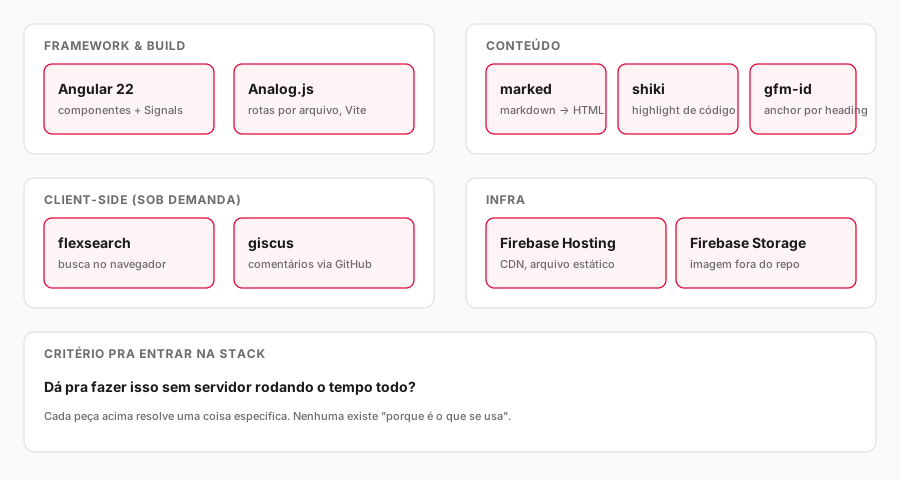
- Angular 22 + Analog.js: the base of the site, as explained above.
marked+marked-shiki+marked-gfm-heading-id: turn Markdown into HTML, with real code highlighting (not a plain colorless <pre>) and an automaticidon every heading, so a specific section of a post can be linked directly.flexsearch: a search engine that runs entirely in the reader's browser. No search backend, no network call on every keystroke.giscus: comments backed by GitHub Discussions. No comment table to maintain, no moderation endpoint to run.- Firebase Hosting: serves the static files behind a CDN.
- Firebase Storage: holds the images that aren't site branding (post diagrams, share cards), so the repository doesn't get weighed down with binaries.
Every piece earned its place by solving a specific problem, not because "it's what people use." The actual filter was always: can this be done without a server running all the time?
How a post comes together
- Write the post in Portuguese (
src/content/posts/), with front-matter (.md title,description,date,tags). - Write the English version from scratch (
src/content/en/posts/), same.md slug. Not a line-by-line translation, the same subject thought through for an English-speaking reader. - If the post needs a diagram, generate the SVG and upload it to Firebase Storage
with
upload-image.mjs. - Generate the share card (the image that shows up when someone drops the link
in WhatsApp): a script (
generate-og-card.mjs) builds an HTML page with the real title overlaid on the same background used for the page's own cover, a headless browser screenshots it at 1200x630, and that also goes to Storage. - A validation script checks that both files (pt and en) exist and have complete front-matter before moving on.
npm run buildprerenders every route into ready-to-serve HTML.- Deploy to Firebase Hosting.
None of these steps need an external CMS. Publishing means writing a file, running a script, and pushing it out.
SEO: what goes into every page
None of this SEO work is generic boilerplate, it's what SeoService
(src/app/seo.service.ts) builds for every route, every time the page changes:
- Title and description specific to each page, not one fixed string reused everywhere.
- Canonical and hreflang (
pt-BR,en,x-default) pointing at the right language version, so Google doesn't mistake them for duplicate pages. - Open Graph and Twitter Card: title, description, image. On posts, the image is the share card generated in step 4 above (a real JPEG with the actual title), not a generic SVG. SVG is a bad choice here because most link-preview crawlers (WhatsApp, for one) don't render that format at all.
og:image:alt: a description of the image for whoever receives the link through a screen reader.- JSON-LD: structured data (
BlogPosting,Person,WebSite) that helps search engines understand who wrote it, when it was published, what it's about. - Sitemap and RSS generated automatically at prebuild time, straight from the real list of posts, with no manual upkeep.
All of that already ships inside the HTML because the site is prerendered (more on that in the next section). Google never has to execute JavaScript to see the content.
This is the call that runs every time a post page mounts:
this.seo.update({
  title: post.attributes.title,
  description: post.attributes.description,
  path: `/blog/${post.attributes.slug}`,
  image: ogImageUrl(post.attributes.slug),
  imageAlt: post.attributes.title,
  type: 'article',
  publishedTime: isoDate,
});
One method, called with the post's own data, and SeoService figures out the
title, canonical, hreflang, Open Graph, and JSON-LD from that on its own.
Performance: what changed once I actually measured it
Writing about architecture is easy to make sound polished on paper. The real test is running Lighthouse against the live site and seeing what comes back. I ran it, and real issues showed up:
- CSS blocking the first paint. The global stylesheet (about 3KB) was loaded as an external <link>, forcing the browser to wait on that download before painting anything. Since it's the exact same file on every route, a build step now inlines that CSS directly into the <head> of every prerendered HTML page. One less request on the critical path.
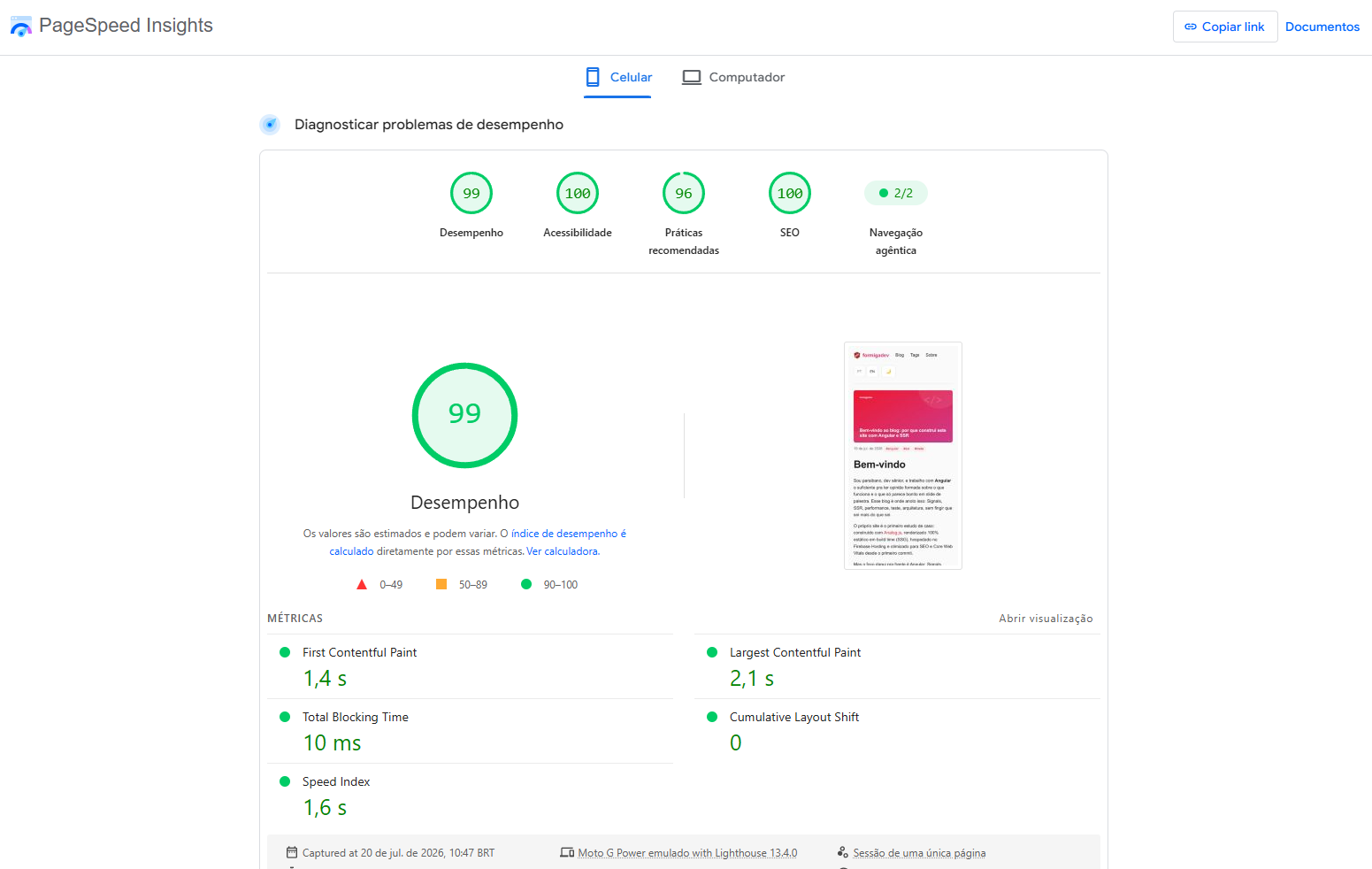
- A giant author photo for a tiny avatar. The image was 449x484 and 84KB, displayed at 56px wide. Cropped it to 280x280 and recompressed: 22KB. A 4x smaller file nobody would ever notice, because the display size was always small. Result in production: Performance 99, LCP (time until the largest visible element appears) at 2.1s, Best Practices 96.
One small fix with a real effect: an extra build step now swaps the CSS <link> for an inline <style> on every generated page, since it's the same file on every route and not worth paying an extra request to fetch:
// scripts/inline-critical-css.mjs (runs after vite build)
const css = readFileSync(cssPath, 'utf-8');
const html = readFileSync(pagePath, 'utf-8');
writeFileSync(pagePath, html.replace(linkTag, `<style>${css}</style>`));
Accessibility: what the audit turned up
On July 18, 2026, at Google I/O Extended João Pessoa by GDG João Pessoa, I watched Angelo Dias give a talk called "Scalable Web Accessibility: how Generative AI is saving WCAG in the cloud," about using generative AI, Gemini, and Shift-Left Testing to support accessibility earlier in development. That was the push I needed to stop theorizing about accessibility and actually run a real audit on this post.
This part turned out cheaper to fix than I expected, and it's the one with the most real-world impact on someone using a screen reader or navigating without a mouse. The reference for all of this is WCAG (Web Content Accessibility Guidelines), the international standard that defines what "accessible" actually means in practice, with objective, measurable criteria like the contrast one below:
- Insufficient color contrast. The tag pills on each post (
#angular,#ssr...) had a contrast ratio of 3.45:1 in dark mode, below the 4.5:1 minimum required for small text. The actual cause: anopacity: 0.75on the parent element was dimming the tag along with the date next to it, when only the date was supposed to look muted. Swapped it forcoloron the right element instead. - An image with no
alt. The post's cover image had noaltattribute at all. Since it's purely decorative (the real title already exists as separate text, overlaid with CSS), the fix isn't writing a description, it's settingalt=""explicitly: that tells a screen reader "skip this image, it carries no information." - A page with no <main>. The <router-outlet> in the app shell
(
src/app/app.ts) wasn't wrapped in any <main> landmark. Without it, anyone navigating by keyboard or screen reader loses the shortcut to jump straight to the content, forced to tab through the nav every single time.
The last two, side by side (before/after):
<!-- before -->
<img ngSrc="/images/post-cover-bg.svg" width="1200" height="630" />
<router-outlet />

<!-- after -->
<img ngSrc="/images/post-cover-bg.svg" alt="" width="1200" height="630" />
<main>
  <router-outlet />
</main>
Result in production: Accessibility 100.
The final scorecard
Putting the three sections above together, measured against this post's own page in production: Performance 99, Accessibility 100, Best Practices 96, SEO 100. None of these numbers came from premature optimization, they came from running the tool and fixing what it actually found.
What was left out, on purpose
- No CMS. A post is a Markdown file in the repository, versioned with the rest of the code.
- No backend of its own. Comments live on GitHub Discussions through giscus, search runs in the reader's own browser.
- No cover image per post inside the page itself. Every post uses the same shared background, with the title overlaid through CSS. One less design decision per post, more visual consistency between them.
Each of those is one fewer moving part running in production, which is ultimately why this blog hasn't needed much maintenance since it went live.
Questions or suggestions? Drop them below, the goal is to grow together with the community.